December 14, 2022
In the previous two parts we’ve reviewed investigating logins to SQL Server, which operate at the top server level. We’ve also reviewed looking at logins at the database level. Today, I’ll be showcasing another couple of ways to view SQL Server security information.
Open source provides a lot of fantastic scripts and software. One of the more popular ones is the First Responder Kit. In that collection of scripts is sp_Blitz. This script is great because it provides a lot of information. The script results can also be problematic, because it provides so much information. On my little SQL Server I use for testing scripts and writing demos, sp_Blitz returned 68 rows across 8 priority levels or categories of issues. Again, wonderful if you want to see all the things! But, what if you’re trying to focus on a particular type of issue, like security? What do you do then?
Run the below and hone in on the “Parameter explanations” section.
exec DBAUtility.dbo.sp_Blitz @Help = 1;

sp_Blitz Help ParameterExplanations
As you can see from the above, you have @IgnorePrioritiesBelow and @IgnorePrioritiesAbove. So if you run something this:
exec DBAUtility.dbo.sp_Blitz @IgnorePrioritiesBelow = 229;
What you see for output is just priority level 230 and above, which returns just the security related output from sp_Blitz.
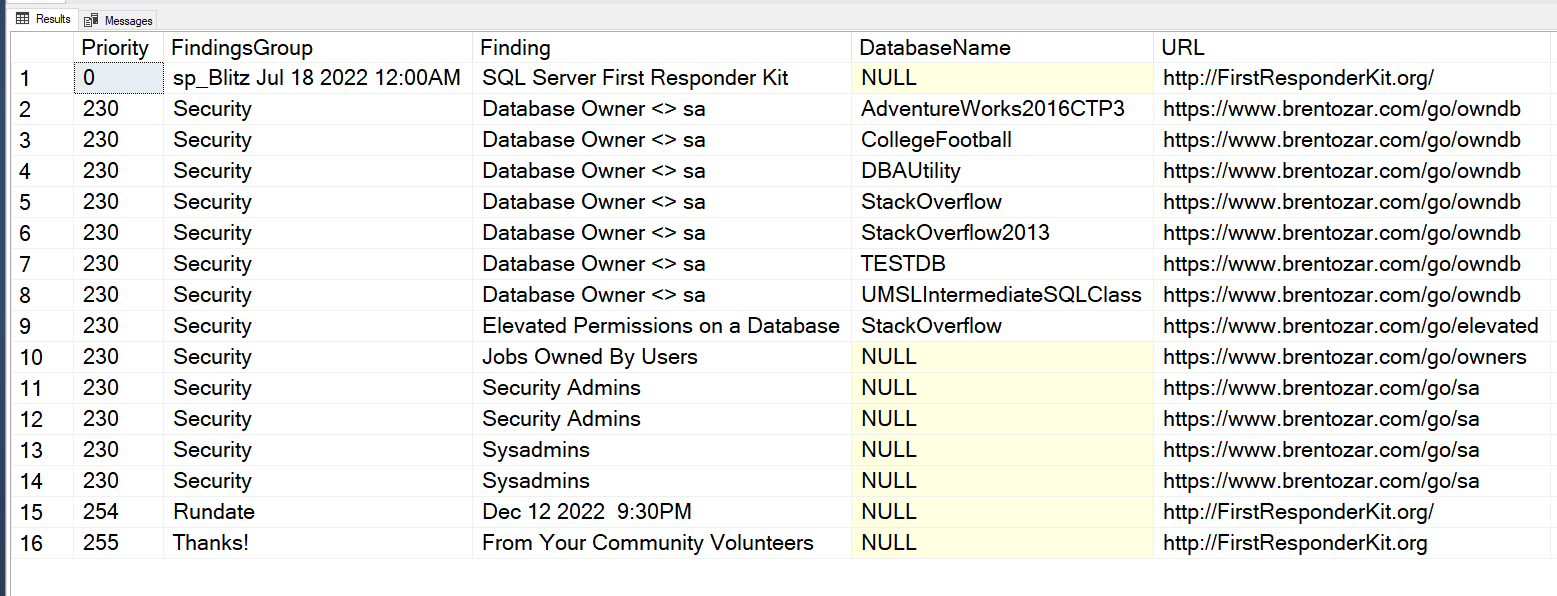
sp_BLitz Security output
This option is very useful for the busy data professional responsible for SQL Server. We’re always being emailed or pinged in a chat program like Teams or Slack. There are regular distractions. Running sp_Blitz with the @IgnorePrioritiesBelow parameter is a great way to keep yourself focused when you’re returning to work on this after distractions from email and chat.
Next Steps To Take
- Get yourself a tall cup of coffee to keep you occupied while you panic over the output of the security section of sp_Blitz on your SQL Servers.